


If you want to improve your marketing effort, you need powerful insights. So, now you can use the following advanced Google search operators or commands to enjoy the advantages.
We all know that Google Search is one of the most common tools used by us. It is probably the most amazing tool in nature. It can be used for finding anything that you need. But do you know this tool can be used to acquire specific results?
If you want to improve the search engine marketing efforts that you have been making for months and years, you must have a detailed knowledge of advanced Google search operators. By using a proper search operator, you can find accurate and efficient results for Google searches like never before.
Implementing the advanced Google search operator can be highly beneficial for marketers as it provides detailed insight. It can help you to gather information for keyword research, content strategy, SEO audits, and a lot more.
So, I have dedicated this entire guide to providing information about everything about advanced Google search operators. This will help you to gather an improved understanding of the use and enjoy the benefits.
Define Google search operator.
Google search operators can be said to be special characters or commands that improve text search capability in the most standard forms.
For using search operators, you have to directly enter the search on the Google search box like a standard text search. But, you will be able to improve the results with these specific Google search operators.
If You Are not yet aware of it, we will find out and details.
You get more specific results: One of the most common benefits of using advanced Google search operators is that it delivers precise results. For example, if you are searching SEO on Google search, you will find over seven 30 million results. From such a vast number of results, it can become hard for you to choose one.
However, when you use the “allintitle” operator, which is an advanced Google search operator, it will reduce the result to 14.6 million. So, the results that you find using the advanced operator will specifically show SEO pages with SEO on the title.
It takes businesses to another level: When you make use of the advanced search operator in Google, it improves the results, which can improve your effort. When you properly use search operators, you can find several link-building and content opportunities. It makes it easy for you to find the SEO issues like indexing errors.
Properly using advanced Google search operators helps to find statistics and improve research that can quickly enrich your content quality. You will get a better understanding of how you can use the competitive long-tail keywords in the content to enhance the results.
Rules of Google search operators:
You need to have an understanding of the two significant rules that you must follow to refine the search results.
- If you don’t use the punctuation properly on the search operator, Google will mostly ignore it.
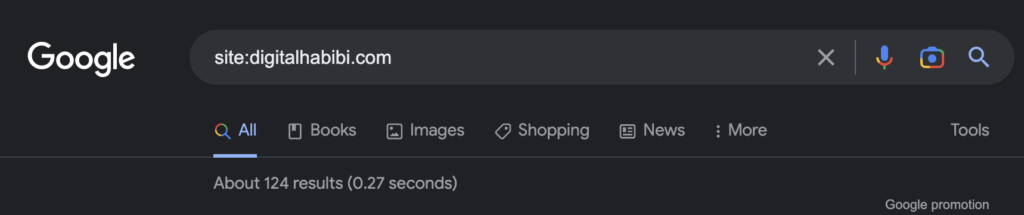
- Make sure that there is no space between any word or symbol in the command or the search term. For example,
site: digitalhabibi. comwill not perform properly, while site:digitalhabibi.com will work.
What are the performing advanced Google search operators?
It becomes convenient and easy to search for things online when you know how to use Google search operators. However, it will require time to master the commands. If you have not used it previously, don’t worry; in the following section, we will find out in detail about these commands.
site:
This is a common operator that helps you to search content hosted on a particular domain. So, it becomes easy to get results from specific websites.
So, if you want to search for something on a specific website like YouTube or Wikipedia but not from any other websites, you need to use the commands like site:wikipedia.org or site:youtube.com.
There are several cases where you can use this search command. However, most commonly, it is used for checking the pages index by Google for particular domains. It can be greatly valuable for marketers if they want to check any domain in specific.
related:
This specific Google search operator is extremely valuable to find out the websites related to the site. However, it is most effective for bigger domains like Search engine land or NYTimes. It helps the bigger domain to check in detail.
When you use the command, it provides you with a list of logs into how Google categorized your website and your competition.
It is also greatly valuable for larger businesses to make a thorough competitive analysis while they are trying to get an understanding of their digital competitors. Remember that digital competitors will significantly vary from offline competitors. So using this command will provide you a detailed insight.
cache:
When you use the cache: search operator, it makes it easier for marketers to locate the recently cached version of a particular webpage. All you need is to write the cache and then the name of the domain.
This command is specifically advantageous for marketers to check the content design or update. Marketers mostly use this command because it can show when and where Google has called the recently made changes on the website.
allinanchor:
This specific command can be used to find out the pages that include all the words in the anchor text. So, if you want to search for the word John Clarke, you will find out the results with both terms in the anchor text.
This will reduce the result, as here you will find the results that include both words. So, it can be very helpful for marketers to check competitors using specific terms.
inanchor:
The next advanced Google search operator is inanchor. This is majorly used by marketers when they wish to find pages that have an inbound link with the anchor text specified in it.
So, you have to use the command and then write the specific word or the anchor text to find the number of pages with that particular word included. However, do not expect to get accurate global results, as the data you will get will be searched according to the anchor text, which might not always be associated with your industry.
This specific command can be highly effective for marketers to evaluate their Link building opportunities. It can also help to keep an eye on the competitive link.
inurl:
If you’re willing to find any page on websites that have specific words or a single word in the URL, this Google search operator can be very useful.
So, marketers can use this command for several purposes. Following are some of the most common uses of this command.
- It helps to diagnose indexing issues.
- It helps to get inspiration for the content on specific topics while researching.
- Helps to find guest posting opportunities.
intitle:
This Google search operator helps you to find pages that are targeted with some search phrases or words. When you use this command with the specific words that you want to search, it will show all the results that have at least one of the terms mentioned in the page title that you have written in the search box.
This is a great way for the search function to find out several guest posting opportunities. It can also check the competitive level for keywords depending on the number of results that you find with specific words.
allinurl:
It is another advanced Google search operator that can help to refine the command present in the URL. So, it will only provide the results that include all the words you have defined in the search.
For example, when you look for certain words like travel checker, it will open all the results that have these specific words in the URL. So, it becomes easier for you to find out the competition along with getting knowledge about the type of content.
allintitle:
This command will check and refine the result like the above command. So, when you use this specific command and write the exact words that you have written above, it will show the results that contain all of the words in the title of a page.
So, unlike the above command that will show you a huge number of results, this command will reduce it as it shows pages that have all the words in specific on their page title. So, it can be extremely helpful for you to do content research or keyword research using this command.
allintext:
It is an advance of the above command. This operator can be helpful for you to refine searches and find pages that include all the terms that you want to search for. The result it shows will have all of the terms on the website page.
When you modify the operator to allintext, you will find that it will instantly remove almost 2,000,000 results. However, you must know that all the words might not be present in the same sentence, but it will be present in different sections of the page or sometimes in the same sentence.
intext:
This command can be extremely beneficial for you if you are looking for any specific phrase or words anywhere in the content. Intext Google search operator provides you with the opportunity to find out the terms that you want to search in any section of a website. It can be page content to the page title.
It is most beneficial to find several link-building opportunities. You can just write the terms sponsored post with this command, and it will find out all the results that provide you with link-building opportunities.
around(X):
The next around(X) command can be effective in finding certain words. However, the X in the bracket shows the number of words or gaps between the words that you are searching for. The X is the minimum gap between words that you’re searching for.
While this is a command that I personally don’t use, it can be an excellent choice for people who are looking for preferences, sentences, or quotes that they tend to forget.
daterange:[XXXXX-XXXXX]
It can be really perplexing for the novices after watching the command. This advanced search operator will display search results within the dates that you specify. However, you need to follow the format of Julian’s date, where you need to write the year and then the number of days.
However, make sure that you do not make any mistakes. So, it is better that you use an online tool to get the right date format.
It can be incredibly beneficial to find out the number of content published on specific topics during a certain period. So, when you write the date format correctly from a particular time, using the keyword, you will be able to find out the number of contents published within that period of time.
filetype:
When you are using this specific search operator with the keywords, it will reduce the results and find the files in the similar format you’re looking for. You can use any kind of keyword and include the format after using the command to get specific results.
Some of the file types that you can find using this command are:
PDF, SWF, DWF, PS, GPX, KMZ, KML, HTML, HWP, XLSX, XLX, PPT, PPTX, DOCX, DOC, ODS, ODP, ODT, SVG, GRTF, TXT, TEXT, BAS, CPP, HPP, CC, JAVA, CS, PY, PL, XML, WAP, WML and a lot more.
This is one of the most beneficial commands which works great for content writers. It provides them with results that can help to get information.
OR
This is an advanced search operator that you might have already used without knowing what it really is. If you wish to combine searches, you can add OR between your search terms in the capitalized form.
Google will show results that will either have the first or the second term. However, you have to make sure that you capitalize the OR command. It is a common and helpful command for researching when you require specific information for more than a single item.
“Keyword”
It is the command where you need to use the quotes while making a Google search. It means that you limit the search to match the exact phrase. Using this command will help Google to find out the webpage that has a specific phase in its description, title, or body.
Apart from the command being used to find out specific phrases in content, it can also be efficient for checking content duplication. You can copy a section of a paragraph and paste it within the quotation, and then start searching. If there are other pages that follow similar words and phrases, it will show the results instantly.
Using The Search Commands Properly To Improve Results:
One of the most amazing things about Google search operators is that it provides you with the opportunity to combine commands with use cases. There is no limit to combining advanced operators to get great results. Once you master the commands, you can mix and get desired results.
You will find endless opportunities when you master the Google search operator and its uses. So, further, we will try to find out some more details to make it convenient for you to take valuable actions.
Link Building Opportunities:
No denying that link building improves your search engine optimization opportunities. It is mostly used by marketers for refining Google searches.
So, if you own a roofing company, you can use a handful of combinations to find sponsored content. Following are the varieties that can help you to acquire the same results.
[topic] intext:”sponsored post”
[topic] intitle:”sponsored post”
[topic] intext:”sponsored by”
[topic] sponsored AROUND(3) post
If you don’t need to find a sponsored post, you can try the following set of combinations.
[topic] inurl:"write-for-us" intitle:"write for us"

[topic] intitle:"write for us"

[topic] "write for us"

[topic] inurl:"write-for-us"
You can use these variations if you are still not convinced by the results.
“become a contributor”
“guest contribution”
“write for me”
“guest post”
Opportunities for infographic submission:
There is no denying the fact that infographics can be a great choice to include in your website. These visual assets can be highly engaging for readers. However, creating an infographic is only half of your task. All you need is to ensure you have appropriately distributed through different channels.
Making use of the advanced Google search operators can help you find the local websites that are ready to feature your infographic. So, all you need is to look for the websites using the correct search term to find the right site with an adequate number of viewers. It will not only ease the search but also improve your marketing efforts.
Social profiles:
By making use of the right search operator, you can build up a proper list of targets. However, what if you don’t find the contact details present on their website?
If you wish to reach a specific personality using social media, these operators are also a great choice. It can easily find out the contact details of any particular person.
Find out indexing issues:
You must be sure about indexing if you’re working on a blog site. So, using the combination of inurl: and site: command, you can diagnose the indexing issues within the specific pages.
Follow this format to find out the indexing errors – site:yoursite.com inurl:tag.
Make the most of the advanced Google search operators:
If all these days you are not aware of the advanced Google search operators and their use, hopefully, from the guide mentioned above, you will get a great idea. Remember that if you want to improve your marketing efforts, you need to have knowledge about advanced techniques. Google allows you to improve your capabilities when you know how to use it.
Since you can use the commands individually or in combination, you can easily customize your search as per your requirements. It is a lot different from regular text search as these advanced Google search operators are highly capable of reducing to only relevant searches. So, whether you have a website or you or a leading company or have a blog website, or may have an offline company that wants to go online, these commands can be beneficial.
However, when you choose an expert SEO, you will be able to improve the opportunities. Since most experts use advanced Google search operators, they can improve their marketing effort and your possibilities. Digital Habibi is one search name of an expert who can guide you throughout, along with improving your marketing effort using Google search operators.
Frequently Asked Questions
Yes! Google search operators are highly effective in refining your search. Whether you are a marketer or a content writer, you can improve the search results using the advanced operator. Most experts use this advanced technology to enhance their marketing efforts.
There is no such specific industry in common as most of the industry can be benefited from these commands. However, there is a need to make the correct use of the commands to make the best use of them.
There are over 40 operators that can help you in the marketing process. However, here I have mentioned the 16 top best operators that can be beneficial for you. You can use them individually or in combination to get the best results.
If you have knowledge about the use of advanced search operators, you can do it on your own. However, if you are into a full-fledged business operation, it is better to have an expert who can make the advanced procedure to improve the marketing efforts.