

If you have heard about Google autocomplete, but do not have much knowledge about what it is, probably this article will be helpful for you. Here you can find out in detail about how Google Autocomplete generates predictions and has evolved from making suggestions.
We all know how Google keeps us on our feet. It always impresses us with its new updates and technology. When you visit the homepage of Google, you definitely know what you’re going to search for in the search box. Whether you’re looking forward to buying a product or looking for a service or want to know the simple weather forecast, you probably know what you want to do
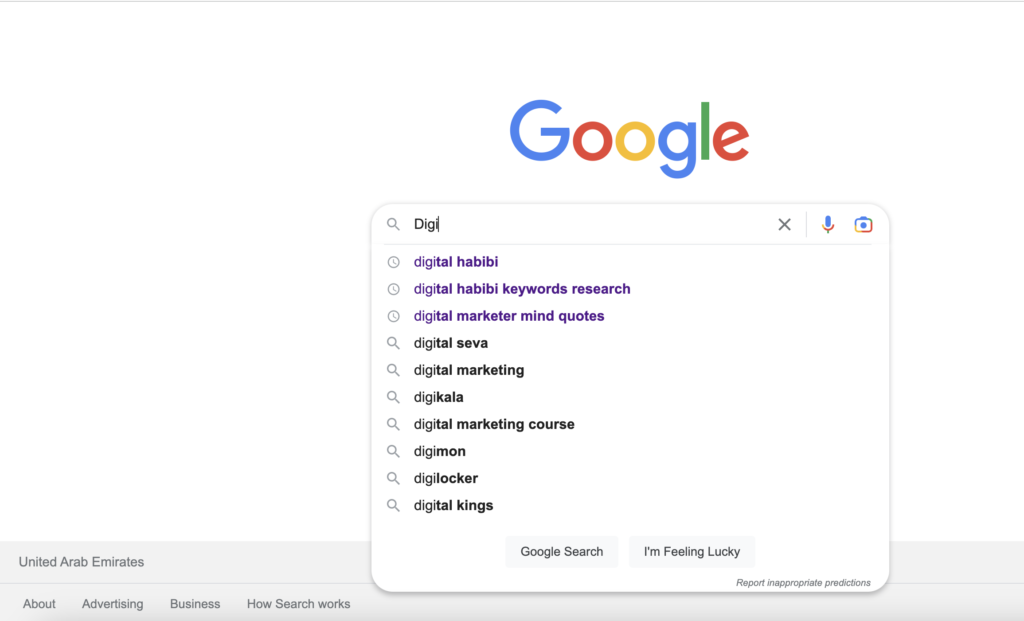
As soon as you enter a single letter or a word, you’ll immediately find a drop-down box that will populate with the list of predictions made by Google before you have finished typing the entire thing. This specific feature is known as Google autocomplete.
However, if you are yet to know what it is and how it comes up with these predictions, make sure you read out this article to understand how it actually works.
Read also: How To Quickly And Easily Fix The Japanese Keyword Hack On Your Website?
What do you mean by Google Autocomplete?
Google autocomplete is one of the features included in the search engine to improve user experience. It is integrated within Google search with the only intention of making everything faster. Once you start typing, Google starts predicting and providing a list of searches that can reduce the time you need to invest in searching.
Google started it as an experimental feature in the year 2004. Later, it took four years for this search engine to fully introduce it as Google suggested. Then again, in 2010, it was renamed Google Autocomplete.
This is not only a feature that is available on the homepage, but you can find it everywhere where you see a Google search box. Following are some of the most common places where you can expect to see a Google autocomplete.
- On the Android and iOS Google App
- On the homepage of Google
- On the search box from Android
- The address bar available in Chrome
You can start typing anything, and you will soon see the drop-down box suggesting relevant searches according to the letters or words that you have put into the box. Therefore, it becomes easier to finish your search and get the topic without the need to type the entire word. Besides, as the prediction keeps changing with the real-time response by watching each character that is being typed, it becomes even more valuable to do personalized searches without investing much time.
This way, users will get fewer options and do not require to type continuously but will get the desired query from the drop-down. All you need is to select, and it will show up in the search box.
But if you’re thinking, why do you require the need for suggestions when you know exactly what you want to search for? The answer as it will save you valuable time. Google Autocomplete started initially as a desktop feature years ago, but it became so time-saving and widespread that it was brought into mobile devices as well.
According to Google, on average, the Google autotype saves around 200 years of typing in a single day on an average basis. It reduces 25% of typing thereby wasting less time.
How does this feature Google Autocomplete work?
To be very honest, Google search is not a mind reader. It does not know what the searcher has in mind. Instead, it makes calculative predictions by checking out the recent searches made by other searchers. Autocomplete generally shows the trending and common queries which are relevant to the letters or characters you’re entering into the Google search bar.
Following are some of the significant factors utilized by Google autocomplete for predicting search queries.
- Trending topics
- Popularity
- Location
- Search History
To be simple, all the results that are shown in the Google search bar are generally influenced by some of the things that you have searched previously, the location from where you are searching, and the data that Google has gathered from the search tab. All of these data automatically would predict by checking the words or letters about the things that you’re searching for.
Let us find out more about it by checking every factor individually.
Search query popularity
When it comes to predicting the search query, one of the most crucial factors is its popularity, which works together with the trending news. However, as trends keep changing and fade over time, they might not be linked with each other. When it comes to trends, more than one subject might be linked together.
Even when some of the searches are very common compared to others, there are some less popular searches that you find will be shown above the common ones in case Google finds them more relevant. In short, it provides more personalized options than popular options.
Trending searches
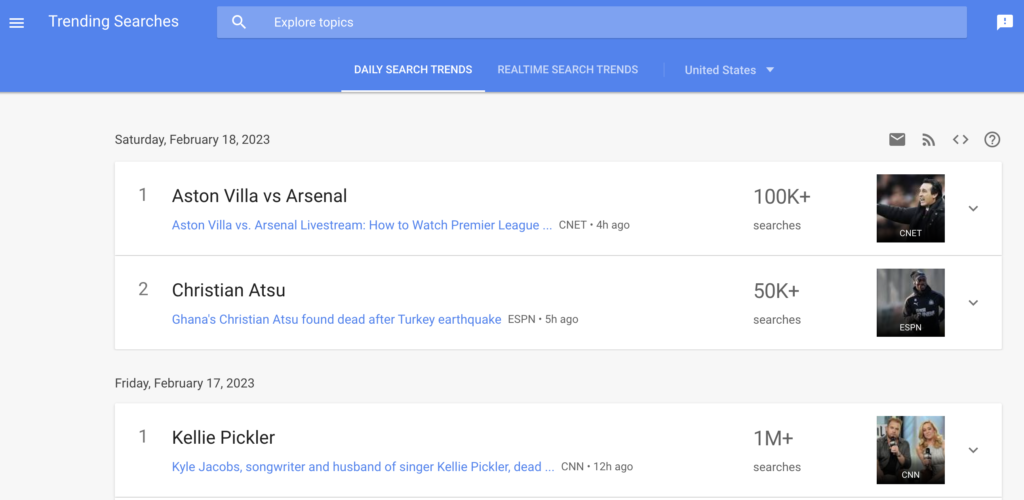
We are all aware of Google trends and how it keeps changing every year. We all know that it analyzes the top search query popularity across different languages and regions. We all know it.
Currently, the current trending search is either a phrase or term which mostly gets popular. This is when flocks of people come to Google to ask similar questions, and hence, it mostly appears in the suggestion list even when it might have very short-term popularity.
Google provides a straightforward example to explain this factor.
When an actress gets married, everyone starts searching for the name of the actress, followed by the wedding on the Google search bar. It can be anyone. In those times, Google mostly suggested that exact term as most people were searching for it.
If Google had not relied on short-term but only on long-term data, it wouldn’t be able to provide the suggestion that appeared in the search box. Ultimately, it would require the searchers to keep typing until they write the entire thing.
Today, Google Autocomplete does not offer a single as it does not harness long-term popularity.
Search queries that have been searched previously
Older predictions made by Google and shown in the drop-down list include a list of questions and topics based on who is searching. To make the process faster and identify what the users might be in search of, google generally keeps shifting the past searches.
You can write anything on the search bar, and it will immediately show you all the searches that you have previously searched for. It is generally highlighted in purple. However, if you’re searching from mobile, it might look a little bit different. If you have previously used the exact words or changed something, it will show a tiny clock-like icon on the left, which shows that you have previously searched for it.
It also comes with a cross button on the right side which will help you to delete the previous searches easily.
Location and language
With such a personalized service provided by Google, everyone is able to get customized results. No wonder Google has always paid attention to user experience, and hence it is something acceptable. You would find no surprise that everyone who is searching with similar terms is not getting similar results. Of the many factors that affect the user experience, one is language, and the other is the location from where you’re searching.
The state or province, the country, or even the city will provide different suggestions depending on what is happening in the specific area. You will also find different types of suggestions if you have set a particular language.
Why do some predictions get removed by Google?
Google has mentioned that autocomplete is a feature that makes predictions instead of providing suggestions. This can be due to many controversial and several legal claims that were previously made that suggested Google was promoting offensive, harmful and other improper information by suggesting some kinds of search queries.
After the rebranding was made in 2010, Google removed the word suggestion as it might not always be able to provide caring, appropriate and thoughtful terms. This is the reason why this brand would rather prefer to use the word prediction is that it is committed to improving its services by receiving feedback and monitoring the searches.
Moreover, Google and autocomplete were specially designed to help people complete the search that they intended. This feature provides predictions depending on the query you are likely to enter. While the result depends on a range of factors that we have outlined above, Google has removed predictions against the Autocomplete policies. It blocks the following.
- Harmful and violent
- Hateful predictions against individuals or groups based on sexuality, common religion, demographics, or race
- Harmful and dangerous activities
- Predictions that are sexually explicit and would not associate with any sex, education, scientific or medical topics.
Understanding the way inappropriate Google autocomplete happens
Google already has a system that has been specifically designed to catch inappropriate predictions, but as it has to process billions of searches on a daily basis, sometimes there can be some problems. When we say billions of searches, it also means even more than billions of predictions. This means that there can be times when Google might accidentally provide inappropriate predictions.
While there are some predictions that might seem shocking to many and would question why anyone would search for something like this, there are also some predictions that will help you to generate the answers immediately. You can get the needful content that you might be looking for.
There are cases when search results make things even clearer, which users might not be able to structure. You might sometimes think that Google trend is equivalent to Google autocomplete, but it is not so. Google Trends has been specially designed to research search topics and their popularity over time, irrespective of their search intent.
Is it possible to report any inappropriate predictions?
If you have experienced such a wrong prediction that you are not feeling right or making you feel uncomfortable or offended, you can definitely choose to report the prediction. If you look down, you’ll find Google provided a Report inappropriate prediction link that would appear below the desktop or search box.
If you’re using Android or any other mobile, you can simply keep pressing the prediction to find the reporting option. However, if you are using an iOS phone, you can simply swipe to the left to see a reporting button.
Google always ensures to provide the ultimate user experience and reassures its users that they not only remove the prediction to offer better solutions but also prevent such inappropriate predictions from coming in the future.
Google autocomplete is more than just Autocomplete
Irrespective of the user type, location or language, Google autocomplete can be beneficial for everyone. It becomes extremely helpful for the searchers to get an appropriate search without even writing the whole sentence. It reduces the time that you need to put into searching for loads of answers quickly.
Whether you’re simply using it for a marketing strategy or researching keywords or content ideas, or even buying a product, Google autocomplete is definitely a fantastic tool.
It becomes extremely valuable for marketers to find out what are the most trending topics or the most commonly used search terms by people. They can use this in their marketing strategy to improve their visibility and traffic.
FAQ
Google makes use of some of the most common factors like trends, previously searched queries and the popularity of search queries. Depending on the location from where you’re searching, Google will look for the trending topics depending on the letters or words you input. Apart from this, it might also check the previously searched terms and provide predictions accordingly.
Yes, it is. Since Google also keeps data on the most trending topics, when you use the terms properly in your marketing strategy, they can definitely become valuable and help you to get closer to your potential audience.
Yes, it does. Google makes sure to improve user experience in every possible way. Irrespective of the device you use, whether it is a laptop or desktop or iPhone or Android smartphone, Google has the availability of reporting in case the predictions are inappropriate or uncomfortable.
No. Google trend is a tool that helps marketers understand trending topics. However, google auto suggest is something that is universal. Even when both can be used for marketing strategies, both are largely different from each other.